Month-End Bookkeeping Tips to Keep Finances on Track
Follow these month-end bookkeeping tips to track cash flow, reconcile accounts, manage invoices and keep your business finances organised.

More than 7 million businesses worldwide rely on QuickBooks Online to manage their finances. Designed for sole traders, start-ups and growing businesses, it combines powerful accounting tools with an easy-to-use cloud platform that helps you save time and stay in control.
Unlike traditional desktop software, QuickBooks Online gives you secure access to your accounts wherever you are. Whether you’re in the office, working from home or meeting clients, your financial information is always available and up to date.
With automation, real-time reporting and seamless integrations, QuickBooks helps reduce manual administration so you can spend more time focusing on your business.
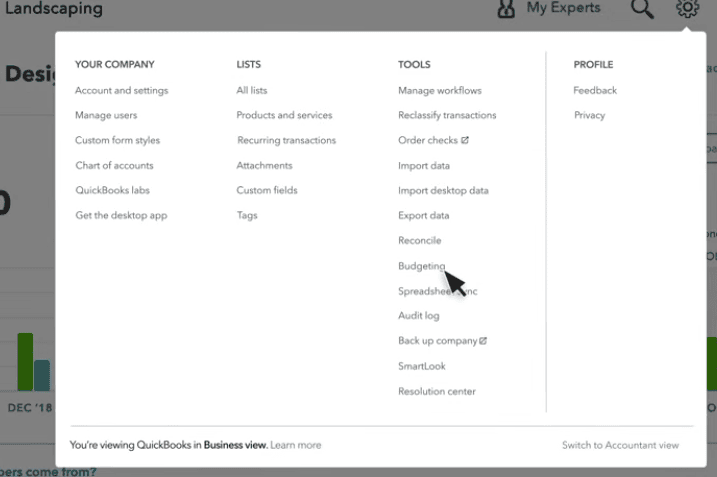
QuickBooks Online is designed to simplify everyday accounting and provide greater visibility over your finances.
With QuickBooks you can:
Many businesses choose to move from Sage to QuickBooks Online because they want a more flexible accounting solution that’s easier to manage.
QuickBooks Online eliminates the need to work from a single computer and removes the hassle of installing software updates. Automatic bank feeds reduce manual data entry, while the cloud platform allows you to access your accounts whenever you need them.
Its extensive range of integrations also makes it easy to connect your accounting software with other business systems, helping to streamline daily operations and reduce duplicate work.
Switching to QuickBooks Online doesn’t have to be complicated.
Our experienced team can migrate your financial data from Sage 50 and other accounting systems, helping you move to QuickBooks with minimal disruption.
If you prefer a fresh start, we can create a brand-new QuickBooks Online company file and configure everything for you, including your chart of accounts, customers, suppliers, opening balances and VAT settings.
We’ll make sure your QuickBooks account is ready for day-to-day use from the moment you go live.
Getting the right software is only the first step. Knowing how to use it effectively is what delivers long-term value.
As certified QuickBooks ProAdvisors, we provide personalised QuickBooks Online training tailored to your business. Sessions are delivered live via Zoom on Tuesdays and Thursdays, with on-site training available on request.
Whether you’re new to QuickBooks or want to improve your team’s knowledge, we’ll help you build the confidence to manage your accounts efficiently and make the most of every feature.
Follow these month-end bookkeeping tips to track cash flow, reconcile accounts, manage invoices and keep your business finances organised.
Avoid common bookkeeping mistakes small businesses make. Learn how to keep accurate records, manage invoices, VAT and cash flow with QuickBooks Online.
Learn the bookkeeping basics for small businesses, from Profit & Loss and Balance Sheets to bank reconciliation, expenses and QuickBooks.
| Cookie | Duration | Description |
|---|---|---|
| cookielawinfo-checkbox-analytics | 11 months | This cookie is set by GDPR Cookie Consent plugin. The cookie is used to store the user consent for the cookies in the category "Analytics". |
| cookielawinfo-checkbox-functional | 11 months | The cookie is set by GDPR cookie consent to record the user consent for the cookies in the category "Functional". |
| cookielawinfo-checkbox-necessary | 11 months | This cookie is set by GDPR Cookie Consent plugin. The cookies is used to store the user consent for the cookies in the category "Necessary". |
| cookielawinfo-checkbox-others | 11 months | This cookie is set by GDPR Cookie Consent plugin. The cookie is used to store the user consent for the cookies in the category "Other. |
| cookielawinfo-checkbox-performance | 11 months | This cookie is set by GDPR Cookie Consent plugin. The cookie is used to store the user consent for the cookies in the category "Performance". |
| viewed_cookie_policy | 11 months | The cookie is set by the GDPR Cookie Consent plugin and is used to store whether or not user has consented to the use of cookies. It does not store any personal data. |